
Overview
In just 5 seconds, create stunning videos effortlessly with our AI Video Generator. Generate short second clips with no waiting. Use prompts for longer, detailed videos, and enhance quality with upscaling and frame improvements. Incorporate facial features from photos and animate specific parts of an image. Create new videos based on poses from existing ones, like making a dance cover video with a specific face. Perfect for personalized content, our tool makes video creation simple.
Key Features
Rapid Video Creation:
- 5-Second Processing: Generate stunning videos in just 5 seconds, enabling quick content production.
- Instant Short Clips: Create short second clips with no waiting time, perfect for social media content.
Customization and Enhancement:
- Prompt-Based Generation: Use text prompts to create longer, more detailed videos tailored to specific needs.
- Quality Improvement: Enhance video quality through upscaling and frame improvements.
- Versatile Output: Suitable for a wide range of video production needs, from quick social media clips to complex animations.
Advanced Video Manipulation:
- Facial Feature Integration: Incorporate facial features from photos into generated videos.
- Selective Animation: Animate specific parts of an image for partial motion effects.
- Pose-Based Video Creation: Generate new videos based on poses from existing ones, like creating dance cover videos with a specific face.
Time and Effort Savings:
- Simplified Process: Makes sophisticated content creation accessible to all users, regardless of technical expertise.
- Rapid Iteration: Quickly generate and modify videos, significantly reducing production time.
Creative Possibilities:
- Novel Content Creation: Open up new avenues for creative expression through AI-assisted video generation.
- Personalization: Easily create custom video content for various applications, enhancing personal and brand communication.
How to use

Accessing the Video Generator
- Open the left bottom mode switch button in Ask AI.
- Select “Video generation”:
- Uses the AnimateLCM model.
- Generates an 8-second video as the default option.
- Offers slightly better video consistency compared to Fast Video generation.
- Select “Fast Video generation”:
- Uses the AnimateDiff-Lightning model by ByteDance.
- Generates a 5-second video as the default option.
- Allows you to create a video that incorporates facial features by using a face image, or to partially animate an original image.
- Offers a loop option.
- Select “Pose Video generation”:
- Extracts poses from a reference video file.
- Applies the poses to a face image to create dance or pose videos.
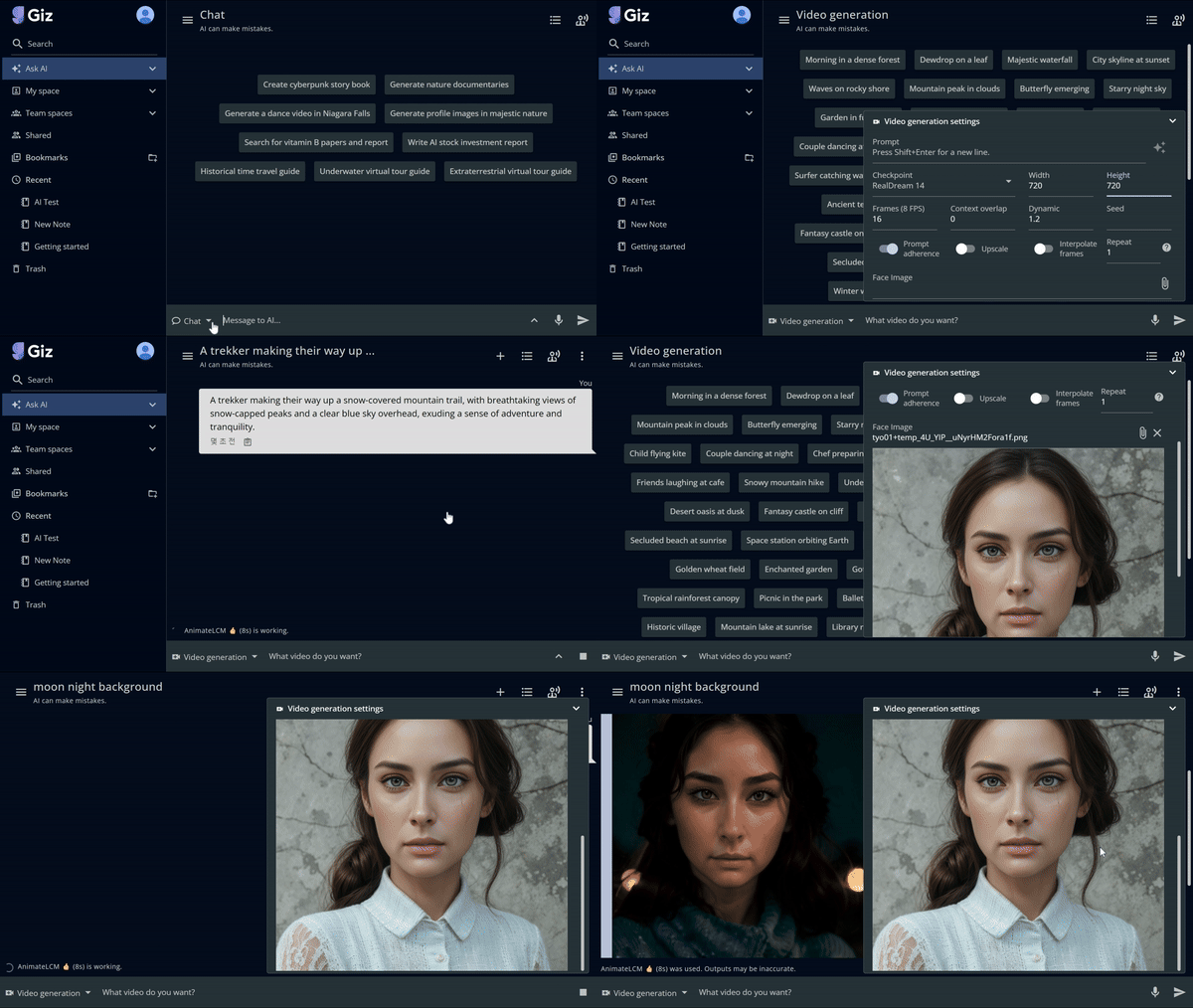
Video Generation Settings
- Prompt: Enter your video description. Use Shift+Enter for new lines.
- Checkpoint: Select “RealDream 14” or other available models.
- Dimensions: Set Width (480) and Height (720) as needed.
- Frames: Set to 16 FPS (Frames Per Second) or adjust as required.
- Context overlap: Currently set to 0. Adjust if needed.
- Dynamic: Set to 1.2. Modify to control video dynamism.
- Seed: Enter a value for reproducibility (optional).
- Additional Settings:
- Prompt adherence: Toggle on/off
- Upscale: Toggle to enhance video quality
- Interpolate frames: Toggle for smoother transitions
- Repeat: Set to 1 or increase for loop effect
- Face Image: Upload an image to incorporate specific facial features
Conclusion
GizAI’s AI Video Generator revolutionizes video production by offering a powerful, user-friendly tool that combines speed, quality, and creative flexibility. This feature exemplifies GizAI’s commitment to making advanced content creation accessible and efficient for all users.